
Connect Home Assistant Energy Devices to IAMMETER Cloud
If your meter, inverter, or other energy device is already connected to Home Assistant, you can now reuse that data in IAMMETER Cloud without adding another physical meter first.
🔗 https://www.iammeter.com/blog/connect-home-assistant-energy-devices-to-iammeter-cloud
来源:iammeter.com · 2026-05-09
I posted a message which seems to have disappeared, are you able to restore the historical data one of my places in the portal? It got messed up when I was trying to add my Victron details into the existing place where I wanted the additional inverter details in there, and DC solar charger.
I was reading that when you delete and re-setup the place the historical data would remain which was not the case at all.
I don't mind if I loose yesterday and today data, but if it is possible it would be ideal to upload this data with csv of similar?
Some feedback on this, works quite well and is easy to setup, thanks for the great work on this.
There is a problem, when I add the AC Storage in a single phase it is not showing the SOC in the portal.
When I previously added this as a three phase, the same SOC sensor works and displayed in the portal correctly.
I have looked at the portal place where I have added the battery data, it is currently showing power being provided to the battery from the grid when in fact we are exporting to the grid, all the power is being provided by the solar.
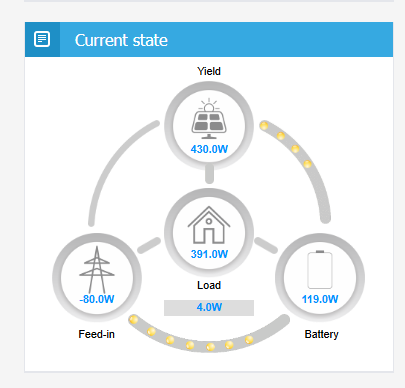
I believe it is due to my Solar DC battery charger PV which is not in this, as there is not way to monitor this without the virtual meter from the Victron, this was why I tried to add the extra inverter information using the same "clamp" hoping it would add the two together the AC and the DC inverters, but it did not look like this was what happened.
Currently in my three phase clamp the only figure that is accurate is the grid figure, and special load, the load calc and the inverter details are not fully representative of the system.
What frequency is the data refreshed in the portal? because I will then make some new sensors that take this into account average this power over that period rather than a snap at that point in time, if this is how it works?
I have attempted to create a new Home in the portal with the details from home assistant, but can't get the current state flow to be correct.
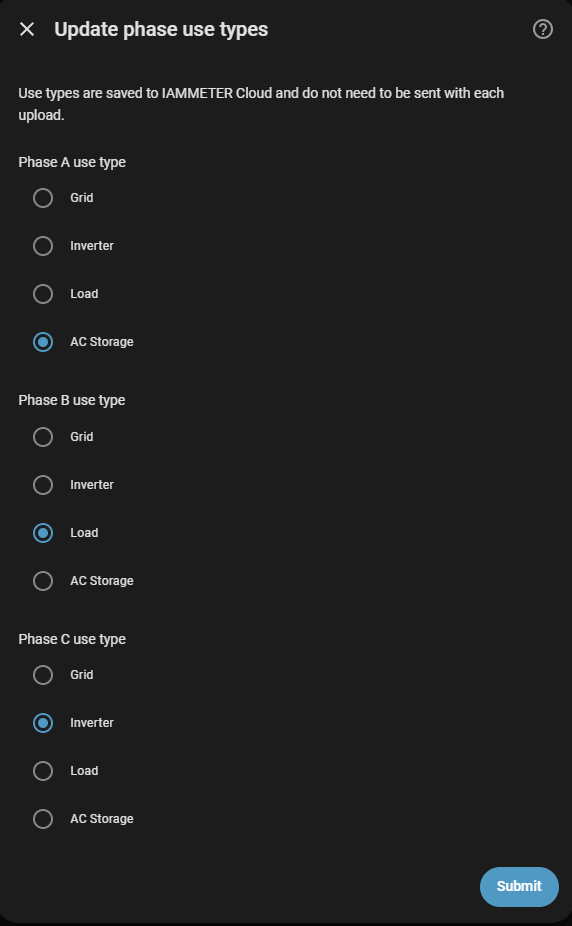
How does this need to be configured as below to calculate the current state graph above, because right now it feels like I need 4 phases, the Grid or load switching below makes the other figures look wrong in the current state graphs.

"I was reading that when you delete and re-setup the place the historical data would remain which was not the case at all."
Sorry, that description may not be correct.
If you remember where you found the statement saying that the historical data would remain after deleting and re-setting up the place, please let us know. We need to check it and correct the article if necessary.
For your other issue, the key point is to assign all the required data sources correctly into the available meter channels.
The physical IAMMETER meter provides 3 channels of directly measured data.
The virtual meter provides another 3 channels, which can receive data forwarded from Home Assistant.
So in total, you can have up to 6 channels in the same place. You only need to assign the required measurements into these 6 channels, for example:
- Grid
- Solar charger
- Solar inverter
- AC storage / battery
If your grid is three-phase and you want to monitor all three phases separately, then the grid will need 3 channels. The remaining channels can be used for the solar charger, solar inverter, and AC storage.
Please note that the grid does not have to be monitored by the physical meter. It can also be monitored by the virtual meter if the grid data is forwarded from Home Assistant. The same logic applies to the other data sources.
The most important point is that the use type must be set correctly for each channel:
- Grid data: set as Grid
- Solar charger: set as Inverter
- Solar inverter: set as Inverter
- Battery / AC storage: set as AC Storage
You do not need to use the Load type unless you want to monitor a specific load separately.
Please also note that IAMMETER-Cloud will sum the power, current, and kWh data together when multiple channels use the same type in the same place. For example, if both the solar charger and solar inverter are set as Inverter, IAMMETER-Cloud may treat them as the total solar generation in some reports or charts.
Sorry, do not have such method ,it is a very dangerous operation to delete the place, so we want to confirm where have such description.

Hi,
Thanks for your feedback.
Regarding the issue that SOC is not displayed when AC Storage is configured as single phase in IAMMETER-Link, this has already been fixed on the cloud side.
You do not need to update IAMMETER-Link. Please just refresh the IAMMETER-cloud page and check again.
If the SOC value still does not appear, please let us know and we will continue to check it.
Thanks.
I can confirm this integration works well and is easy to set up, thank you so much for providing this it is great.
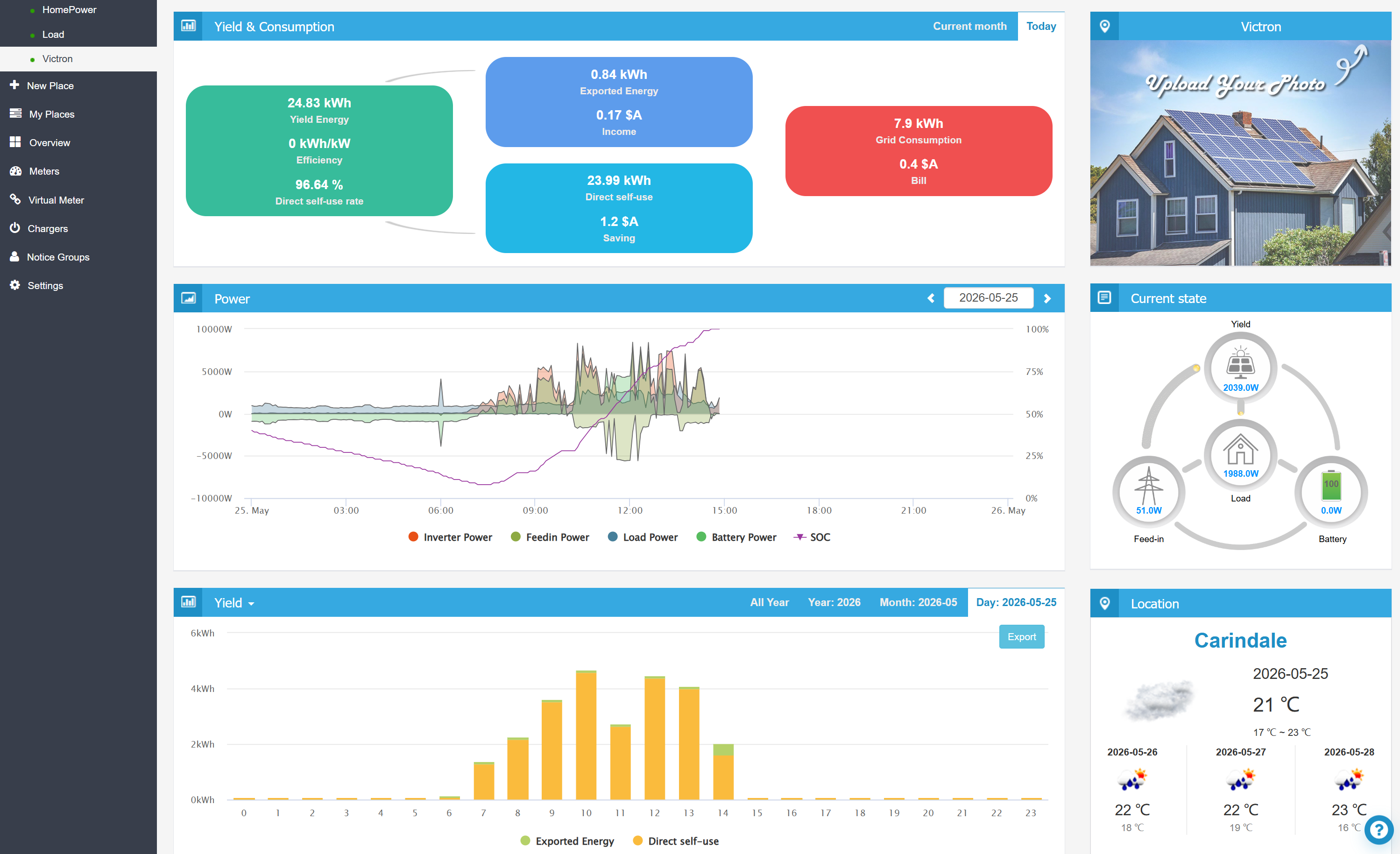
Here is the system integrated into IAM Meter
🔗 https://www.iammeter.com/blog/connect-home-assistant-energy-devices-to-iammeter-cloud
来源:iammeter.com · 2026-05-09
The use case for me to add this integration as a virtual meter was so that I could track
Solar DC-DC Battery charger output, and have the solar data of two inverters combined into this now, with my 3 phase meter it was tracking only AC Inverter power
DC Battery SOC.
The only improvement I would make to this would be to allow other devices in the Current State, and the power tracking window for example Hotwater heating, which is currently in my HomePower place (special load). With this ability you could also then add charging/discharging cars... So in summary allow 4-5 phases.
The NonEss load in the following graph is my hotwater graph from Home Assistant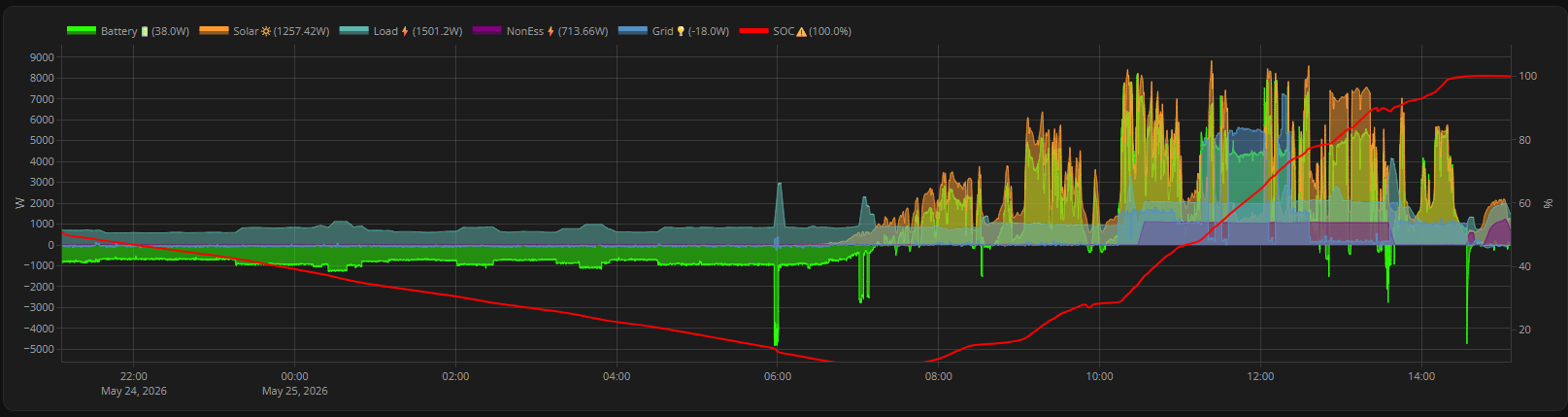
Hi Dan,
Thank you very much for your suggestions.
IAMMETER has just launched a new Contributor Center activity module, and one of the activities is closely related to the topic we are discussing here:
https://contributor.iammeter.com/activities/2
If you are interested, you are very welcome to join this activity.
You only need to create a post in a forum and then submit the post URL on the activity page. The post can mainly describe how you use IAMMETER-Linker to integrate your inverter into IAMMETER-Cloud. Please also mention the inverter brand in the post.
If it is not convenient for you to post in another forum, you can also post it in the IAMMETER forum.
After submitting the post URL, you can receive reward points from this activity.
As this activity module has just been launched, IAMMETER hopes more users can learn about and try this new function as early as possible, so the reward points for early contributions may be higher than those offered later.
Thanks again for your feedback and contribution.
Laoliu